
On this page
- Free servers receive 18 default achievements and can create up to 5 custom achievements. Custom achievements and custom plaque uploads are different features.
- Defaults have fixed details on every plan: enable or disable them, but do not edit or delete them.
- An achievement unlocks when every required task is complete. Optional rewards and the announcement follow the unlock.
- Superatom unlocks all plaque designs, custom uploads, premium activities, unlimited custom entries, and Test in Discord.
- The current /achievements command requires Manage Server permission. A dashboard preview is not a real unlock.
Before you begin
You need Atom in your Discord server, access to that server’s dashboard, and permission to manage its settings. Sign in with the Discord account that manages the server. If the server does not appear, check that you signed in to the correct account and can manage that server before changing achievement settings.
- Open your dashboard, select the server, and open Achievements. Confirm the server name before editing.
- In Discord, give Atom View Channel access to every channel where members should earn achievement progress. Review channel-specific permission overrides as well as the server role.
- Choose whether unlocks should be announced. For a dedicated announcement channel, allow Atom to view the channel, send messages, and attach files; embed-based presentation also needs Embed Links.
- If you will grant or remove roles, give Atom Manage Roles and place its highest role above every reward role it should manage.
- Write a simple launch goal, such as “recognize helpful discussion and regular study sessions,” then choose milestones that actually measure that goal.
Understand Free and Superatom
Free includes a usable achievement collection and custom milestone definitions. Superatom expands the collection and its presentation, and supports development shaped by feedback from the communities using Atom. A custom achievement is a milestone you configure; a custom plaque is uploaded artwork used on its card. You can create the former on Free, while the latter requires Superatom.
On Free, premium choices are disabled and marked with a dollar sign. Use the Upgrade to Superatom action to review plans. Disabling a custom achievement keeps its definition, so it still occupies one of the five custom slots. Delete an unneeded custom entry and save if you want to free that slot; defaults do not use custom slots.
| Setting | Free | Superatom |
|---|---|---|
| Default achievements | 18, with enable/disable controls | The same 18 fixed defaults |
| Custom achievements | Up to 5 configured entries | Unlimited custom entries |
| Preset tiers | Bronze, Silver, Gold | All 10 tiers, from Bronze through Diamond |
| Preset shape | Classic Octagon | All 6 shapes |
| Plaque treatment | Classic Stripe | All 6 treatments, including None |
| Uploaded custom plaques and card colors | Requires Superatom | Available |
| Server boost tenure, Server joined, Successful member invites | Requires Superatom | Available |
| Test in Discord | Requires Superatom | Available for custom entries |
Review and enable the default collection
Atom provides 18 defaults across six activity families, with a Bronze, Silver, and Gold milestone in each family. These entries use the Classic Octagon and Classic Stripe design. Newly added defaults start disabled: choose the entries your server should use, turn their Enabled switches on, and save.
Default titles, descriptions, tiers, plaques, tasks, and rewards are fixed. They cannot be edited, duplicated, advanced with Add Tier, or deleted, even with Superatom. Their only setting is Enabled. To recognize a different target or attach your own rewards, create a separate custom achievement.
The targets below describe eligible tracked activity. A stored XP or level total can already meet a target when progress is reconciled; historical channel-specific messages are not reconstructed. Review existing member totals before introducing an award that should feel like a new challenge.
| Default achievement | Tier | Requirement |
|---|---|---|
| Message Rookie | Bronze | Send 100 messages |
| Conversation Starter | Silver | Send 1,000 messages |
| Conversation Champion | Gold | Send 5,000 messages |
| Voice Regular | Bronze | Spend 60 minutes in voice channels |
| Voice Enthusiast | Silver | Spend 300 minutes in voice channels |
| Voice Veteran | Gold | Spend 600 minutes in voice channels |
| First Applause | Bronze | Receive 25 reactions |
| Crowd Favorite | Silver | Receive 100 reactions |
| Community Favorite | Gold | Receive 500 reactions |
| Reaction Giver | Bronze | React to 250 messages |
| Reaction Regular | Silver | React to 1,000 messages |
| Reaction Champion | Gold | React to 2,500 messages |
| XP Beginner | Bronze | Accumulate 500 experience points |
| XP Earner | Silver | Accumulate 2,000 experience points |
| XP Collector | Gold | Accumulate 5,000 experience points |
| Level Three | Bronze | Reach level 3 |
| Level Five | Silver | Reach level 5 |
| Level Ten | Gold | Reach level 10 |
Choose an announcement channel
The Announcement section at the top of the page applies to the server’s achievement collection. Select a dedicated text channel in Channel if you want Atom to post an unlock message and generated card. The card is attached automatically; you do not need to paste an image URL into the message.
Without an announcement channel, achievements can still complete and apply their configured rewards, but Atom does not post an unlock announcement. Clearing the channel therefore changes delivery; it does not disable achievement tracking. To pause tracking, disable the relevant achievements and save.
Test channel permissions using Atom’s actual role and the channel overrides. A channel that staff can see is not necessarily visible to the bot. If using a thread, also check the permissions and thread state needed for Atom to post there.
Write the unlock message
Enter your announcement in Message. Use Discord formatting for emphasis and the exact placeholders below for member and achievement details. Keep the saved template within 2,000 characters, and leave room for longer names after substitution. The same template is used for each achievement, so it should make sense for every entry you enable.
Use the Message field for the content template shown here. Member avatars and server-name/avatar placeholders are also supported by stored embed fields, but the current Achievements editor saves a content-based announcement. Card reward variables are configured separately in the title and description; they are explained below.
| Placeholder | What it inserts |
|---|---|
| {user_mention} | The member’s Discord mention |
| {user_username} | The member’s username |
| {user_displayName} | The member’s global display name, when available |
| {user_nickname} | Their server nickname, with a display-name or username fallback |
| {achievement_title} | The achievement’s resolved title |
| {achievement_description} | Its resolved description or generated task description |
| {achievement_tier_capitalized} | The tier name with its first letter capitalized, such as Gold |
| {achievement_tier_uncapitalized} | The tier name in lowercase, such as gold |
| {achievement_count} | The primary task’s configured target; not a member’s total unlocked achievements |
| {location} | The qualifying activity location when supplied; otherwise a Discord date |
| {new_line} | A line break |
| {dot} | Atom’s dot emoji |
**{user_mention}**, congratulations! You unlocked **{achievement_title}**.
{achievement_description}
Create and name a custom achievement
Choose Add Achievement, then expand the new entry if needed. Give it a short, specific title and an optional description that states the requirement in plain language. A title is required and can contain up to 64 characters; a description can contain up to 140 characters. The card preview reflects your current edits.
An empty description is valid: Atom can generate one from the achievement’s task configuration. A written description is useful when you need to explain a channel restriction or a community purpose. The title and tier are presentation choices; choosing Gold does not automatically increase the target or make the achievement harder.
- Choose a name members can recognize, such as First Conversation, rather than an internal label such as Messages 25.
- Write the actual condition in the description, including its channel or multiple tasks when that matters.
- Choose the plaque design, configure the trigger and target, and add any rewards before enabling the entry.
- Turn Enabled on when the definition is ready, then save. Adding or editing an entry in the browser does not publish it by itself.
Choose a preset tier, shape, treatment, and icon
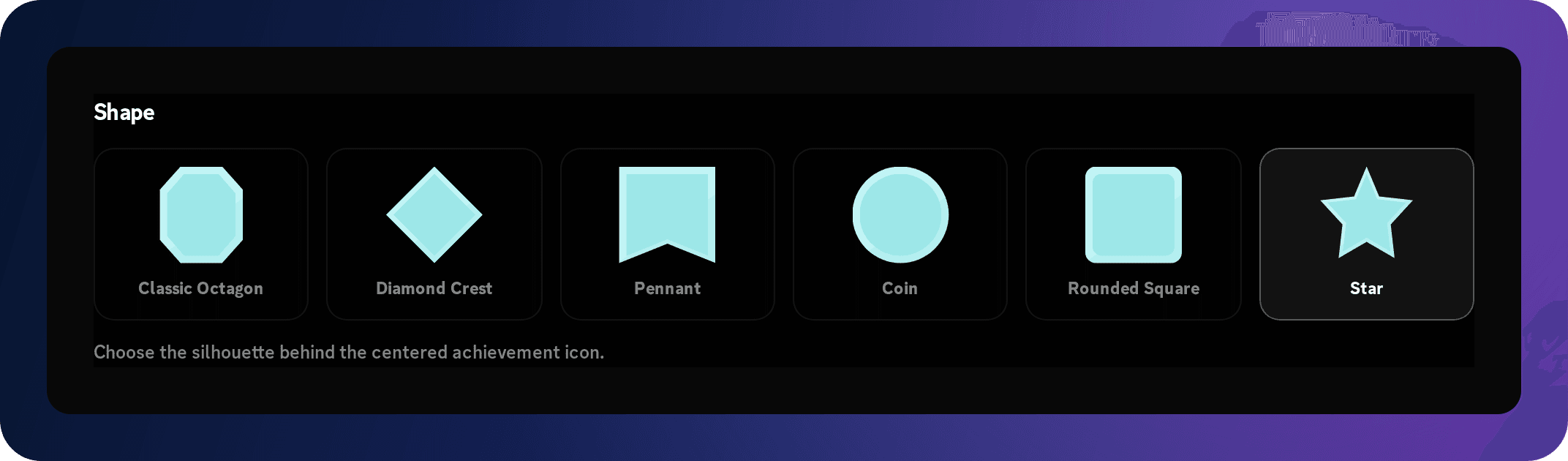
In Plaque Design, choose Preset. Work through Tier, Shape, the plaque treatment, and Icon while watching the preview. Free uses Bronze through Gold with Classic Octagon and Classic Stripe. Superatom unlocks the complete selection below. Choose a visual hierarchy that helps members distinguish an introductory milestone from a rare accomplishment.
The achievement lists in Discord show a small plaque emoji matching the preset’s shape and tier. That emoji summarizes the silhouette and color; the full generated card carries the configured treatment and icon. Uploaded custom artwork is not represented by a preset plaque emoji.
| Control | Available choices | What it changes |
|---|---|---|
| Tier | Bronze, Silver, Gold, Sapphire, Ruby, Emerald, Amethyst, Pearl, Obsidian, Diamond | The preset plaque and card color palette |
| Shape | Classic Octagon, Diamond Crest, Pennant, Coin, Rounded Square, Star | The plaque silhouette |
| Treatment | None, Classic Stripe, Twin Ribbons, Inset Octagon, Chevron Fold, Cross Current | The plaque’s inner pattern; None leaves the face untreated |
| Icon | The icons offered by the dashboard, such as Trophy, Messages, Headphones, Heart, and Crown | The symbol centered on the preset plaque |
Upload a custom plaque with Superatom
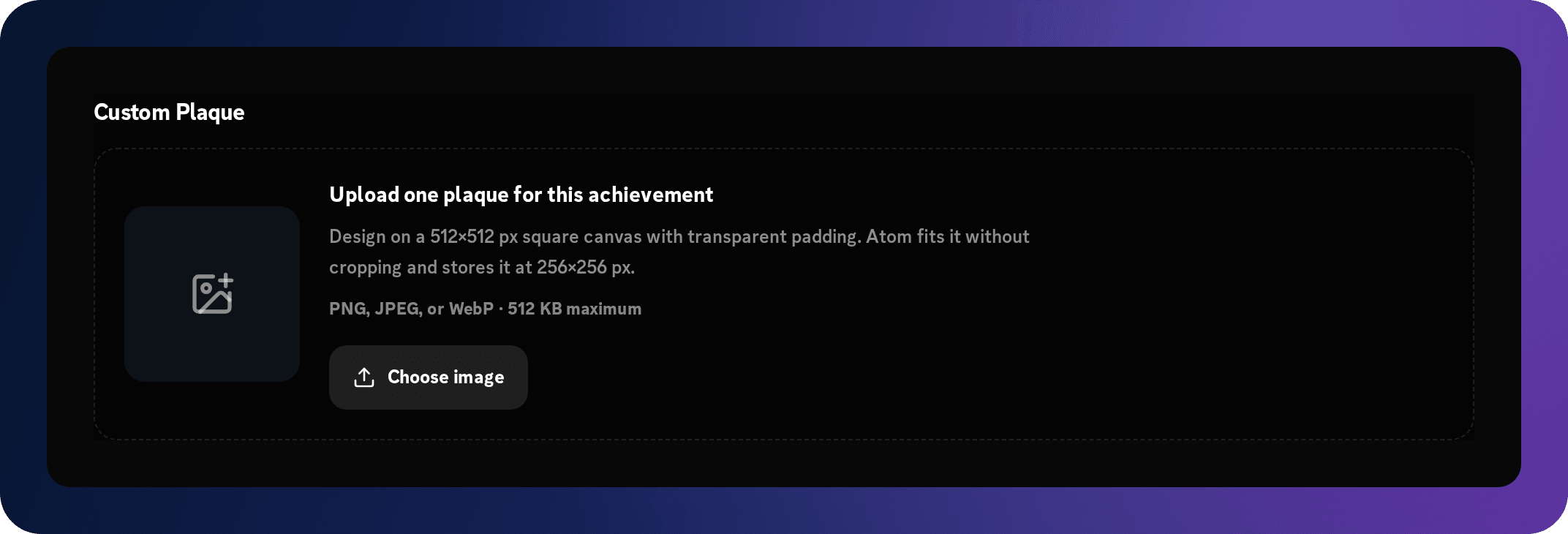
Choose Custom in Plaque Design to replace the preset plaque with your own artwork. This feature requires Superatom even when the achievement itself would otherwise fit the Free plan. Upload a PNG, JPEG, or WebP image no larger than 512 KB. Use a square composition; 512 × 512 pixels is the recommended working size.
Custom changes the plaque artwork; it does not turn the entire card into a freely positioned image editor. Your title, description, requirements, and rewards still use the same achievement settings. A custom entry can be duplicated; review the copied artwork and tasks before saving the new entry.
- Prepare artwork with enough padding that its edges and small details remain readable when reduced. Use a transparent PNG or WebP if you want a cutout silhouette; JPEG cannot preserve transparency.
- Upload the file and inspect its preview. Atom processes the saved plaque into a 256 × 256 WebP asset, so the final Discord artwork will be smaller than your working image.
- Set the separate Border, Eyebrow, Title, and Description colors with six-digit hex values, such as #ffffff. These color the card around the artwork, not the pixels inside the uploaded plaque.
- Check the card against Discord’s dark background. Keep the title and description legible, then save the upload with the achievement.
Use reward variables in the card
The card title and description can insert the rewards configured on that achievement. These variables describe configured amounts and selected role names; they are not the member’s current XP, current level, or total role count. They work in both Preset and Custom plaque modes.
Role indexes start at 1 and follow Discord hierarchy, highest selected role first. Use [2] for the next selected role, and so on. If you select only one Add roles reward, {added_roles[2]} is invalid and blocks saving. Reordering the selected roles in Discord can change which role name an index represents, so review the preview after hierarchy changes.
For a role reward named Study Regular, a description such as “Complete 120 voice minutes to earn {added_roles[1]}” uses the configured role name. If the achievement has no rewards, ordinary descriptive text is usually clearer than a variable that resolves to zero.
| Card variable | Value |
|---|---|
| {xp} | The Add XP amount |
| {levels} | The Add levels amount |
| {removed_xp} | The Remove XP amount |
| {removed_levels} | The Remove levels amount |
| {added_roles[1]} | The highest-position role selected under Add roles |
| {removed_roles[1]} | The highest-position role selected under Remove roles |
Select the trigger activity and target
The first required task defines a Trigger activity and its Target count. Targets are positive whole numbers. Choose the unit based on the activity: messages and accepted actions use counts, voice uses minutes, and tenure uses days. Joining, gaining a role, and manager assignment are one-off tasks with a target of one.
Do not treat a trigger’s name as a moderation judgment. A message count measures eligible messages, not whether those messages were helpful; a trivia submission is not automatically a correct answer. Use manager assignment when staff need to judge quality, event participation, or a contribution Atom cannot measure directly.
| Trigger activity | Target and meaning | Configuration note |
|---|---|---|
| Text messages | Eligible messages sent | Can be scoped to a channel |
| Voice activity | Eligible credited voice minutes | Can be scoped to a voice channel; follows voice-crediting rules |
| Reactions added | Reactions the member adds | Can be scoped to a channel |
| Reactions received | Reactions added to the member’s messages | Can be scoped to a channel |
| Reactions removed | Reactions the member removes | Counts removals, not additions; can be channel-scoped |
| Reactions removed from your messages | Reactions removed from the member’s messages | Can be scoped to a channel |
| XP earned | Current accumulated XP | Uses the member’s saved XP total |
| Levels reached | Current level | Use a level target such as 5 or 10 |
| Crates claimed | Accepted crate claims | Requires members to actually claim crates |
| Trivia questions answered | Accepted trivia answers | Measures accepted submissions; do not describe it as a correct-answer counter |
| Server joined | A non-bot member joins the server | Target 1; Superatom; does not replay all historical joins |
| Community tenure | Days since the member joined the server | Uses Discord’s current join timestamp |
| Server boost tenure | Days since the member’s current boost began | Superatom; uses the current boost timestamp |
| Commands used | Successful Atom slash commands | Commands sent to other bots do not count |
| Successful member invites | Distinct members attributed to regular invite links | Superatom; all rewards are disabled |
| Role gained | The selected role is added to the member | Select the required role; target 1 |
| Selected achievements unlocked | Every selected prerequisite achievement | Choose existing entries; the target follows the number selected |
| Achievements unlocked | A target number of completed achievements | Use a collection count; it does not require a specific named set |
| Assigned by server managers | A manager grants the achievement | Target 1; must be the only task |
Scope activity to a channel
Message, voice, and reaction tasks can optionally select a channel. Leave the channel empty to count eligible activity across the server, or select the channel that defines the milestone. A “Study Room Regular” should use the study voice channel rather than counting every voice room.
A channel restriction belongs to its task. In an achievement with several tasks, review each task’s channel separately. The server’s achievement exclusions still apply; selecting a channel does not override a member, role, or channel blacklist.
Channel-specific history cannot be reconstructed from a single server-wide total. If you introduce a new channel-scoped milestone after members have already been active, test new eligible activity in that channel. Do not expect /update achievements to recover old channel-level message, voice, or reaction events.
Combine several required tasks
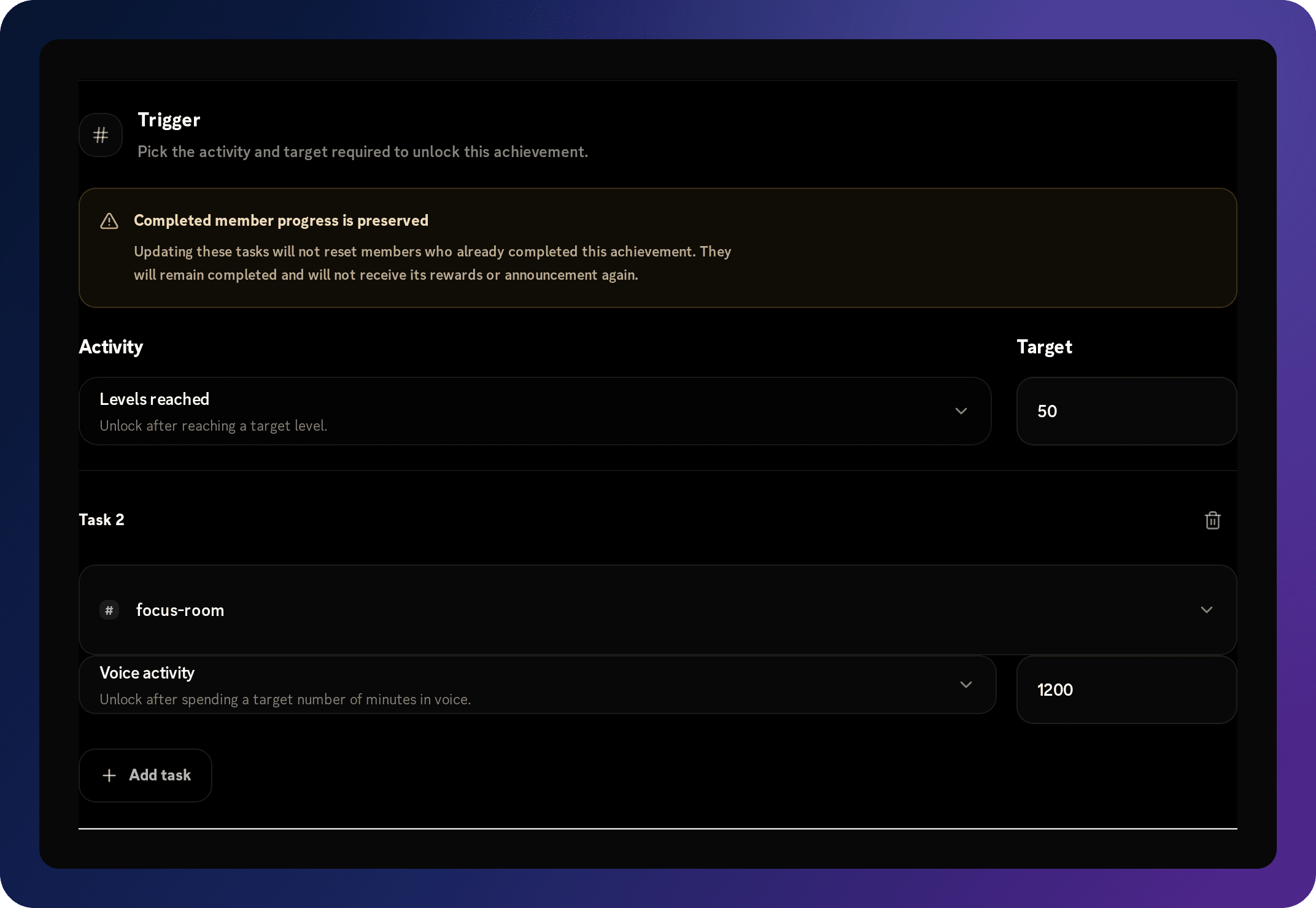
Use Add task when a milestone should require more than one condition. An achievement supports up to 10 tasks and unlocks only when every task reaches its target. This is an AND rule: reaching level 10 does not finish a card that also requires 120 voice minutes.
A manager-assigned task must stand alone. Do not combine it with automatic tasks as a hidden approval gate; create a separate manual achievement if staff recognition is needed. Percentage progression adjustments in /achievements assign and unassign are unavailable for multi-task achievements.
The list’s percentage summarizes the required task progress rather than replacing those tasks with one counter. A partly completed card can therefore show progress while still waiting on another condition. Use explicit targets in the description so members can tell what remains.
- Configure the first trigger and target, then choose Add task.
- Choose the additional task’s activity, target, channel, or required role as appropriate.
- Repeat only for requirements the member should actually understand and be able to complete.
- Rewrite the card description so it explains the combined milestone, and inspect both a partly complete and a fully complete member.
Build prerequisite and collection milestones
Selected achievements unlocked requires all entries you select. Use it for a named sequence, such as completing three onboarding achievements. Achievements unlocked requires a number of completed achievements and is better for a broad collector milestone. These tasks can be combined with other automatic requirements.
Create and save the prerequisite entries before selecting them in another achievement. Select existing achievements with a path to completion, avoid selecting the achievement itself, and do not create a circular dependency such as A requiring B while B requires A. Invalid references and dependency cycles block saving.
Unlocking another achievement can reevaluate collection tasks. An explicit achievement synchronization also reevaluates them. If a chain does not finish, inspect the actual prerequisite completions rather than assuming a high overall collection count satisfies a selected-achievements task.
Understand eligibility, timing, and invite tracking
Automatic achievements respect the server’s achievement exclusions for members, roles, and channels. They also depend on the relevant activity being accepted and processed. Voice progress follows the server’s voice-crediting mode; a long connection alone is not proof that all of its minutes were eligible.
Community tenure and boost tenure are calculated from Discord member timestamps when Atom encounters the member through supported activity, a join or member update, an Atom slash command, an achievements view, or synchronization. Crossing a day threshold during complete inactivity does not schedule an immediate announcement. Community tenure uses the current join time; boost tenure uses the current boost start time, rather than adding separate past boost periods.
Invite attribution compares regular invite-code usage when a member joins, so Atom needs access to the server’s invite list. Counted invited member IDs are deduplicated, and bot members are excluded. Vanity links do not identify an inviter. If Atom has no previous invite snapshot, the first join can establish a baseline without crediting an inviter.
Successful member invites is recognition only: any achievement containing an invite task has all XP, level, and role rewards disabled in both directions. Adding another task does not remove that restriction.
Configure optional rewards
In Rewards, select a reward type first, then enter the amount or choose the roles it requires. Use Add for grants or increases and Remove for deductions or role removal. Each category can appear once; an empty reward list is valid and often suits early activity milestones.
Role rewards require Manage Roles and an eligible hierarchy position. The dashboard prevents selecting roles at or above the bot when it has that hierarchy information. Check the real server hierarchy before promising an access role, and avoid accidentally selecting a staff role for a routine activity target.
A real unlock records completion before attempting its rewards and announcement. If a role or message fails, the achievement can remain completed. Repeating the same activity does not automatically replay a completed achievement’s rewards. Diagnose the failed delivery rather than repeatedly granting or revoking the achievement.
Unassigning or removing progress does not reverse rewards already delivered. It also does not delete an old announcement. If a genuine correction requires a role or XP change, review and perform that correction separately.
| Reward | What to configure | Effect on unlock |
|---|---|---|
| Add XP | A whole-number XP amount | Increases the member’s XP |
| Remove XP | A whole-number XP amount | Deducts XP |
| Add levels | A whole-number level amount | Increases the member’s level |
| Remove levels | A whole-number level amount | Decreases the member’s level |
| Add roles | One or more roles below Atom in the hierarchy | Grants the selected roles |
| Remove roles | One or more roles Atom can manage | Removes the selected roles |
Worked example: a Free conversation milestone
This example creates a custom achievement without using Superatom features. It recognizes 25 eligible messages in a chosen community channel. The target is an illustrative starting point; choose a target appropriate to your server’s activity and rules.
Free cannot use the Superatom Test in Discord preview. You can still inspect the live dashboard card preview and perform a controlled real unlock. Do not lower an established public milestone simply to test it: that can affect members whose saved activity already meets the lowered target. Use a separate temporary custom entry if your five-slot allowance permits, then disable or remove that custom test entry and save when finished.
- Choose Add Achievement and name the entry First Conversation.
- Set the description to “Send 25 eligible messages in our community chat.” Choose Preset, Bronze, Classic Octagon, Classic Stripe, and a Messages icon.
- Set Trigger activity to Text messages and Target count to 25. Select your community chat as the task’s channel.
- Leave Rewards empty. Select an announcement channel if you want the unlock posted, and use the example template above.
- Turn Enabled on and save. Confirm the entry now appears in the saved collection.
- With a permitted staff test member, review progress before and after natural eligible activity in the selected channel. This is a real progress test: reaching the target creates an actual unlock and announcement if configured.
Worked example: a Superatom combined milestone
Create Community Architect for members who reach level 10 and contribute 120 eligible voice minutes in a focus room. This example combines two automatic tasks and a role reward, with a distinctive preset shape. The level and minute targets are examples, not values imposed by the tier.
If an existing member already exceeds the level target, the voice requirement still matters. If the voice task is channel-scoped, server-wide historical voice minutes cannot replace the missing channel-specific progress. The cosmetic preview verifies the message and card; it does not prove either task or the role grant has run.
- Add a custom achievement named Community Architect and describe both requirements.
- Choose Preset, Gold, Star, and your preferred treatment and icon.
- Set the first task to Levels reached with target 10. Add a Voice activity task with target 120 and select the focus voice channel.
- Add an Add roles reward and select a suitable Community Regular role below Atom.
- Preview the card and use Test in Discord to check its presentation before publishing.
- Enable and save the definition, then verify a real member with one task complete remains uncompleted. Check a real unlock only after both tasks are satisfied.
Test the draft in Discord with Superatom
Expand a custom entry and choose Test in Discord to send the current draft card and message to the selected announcement channel. This feature requires an active Superatom subscription, a selected channel, and a tester who is a member of that server. It can include an uploaded custom plaque before the draft has been saved.
The test message is labeled “Achievement test · no unlock or rewards” and suppresses mention parsing. It does not grant an achievement, change member progress, apply XP or levels, or add and remove roles. You still need a controlled real unlock to verify task eligibility and reward delivery. Default entries have fixed details and do not expose this custom-entry test control.
- Choose the announcement channel and finish any required title, task, and reward-variable fields.
- Inspect the browser preview, then select Test in Discord. Wait for its success or error message.
- Read the posted message in Discord and inspect the attachment at normal viewing size. Verify that the recipient name, title, description, colors, and line breaks make sense.
- Wait at least 15 seconds before sending another test for the same server and tester.
- Save separately when the configuration is ready; a successful test does not publish the draft.

Save and verify the published configuration
Use the page’s save action after editing announcements, entry enablement, cards, tasks, or rewards. Saving validates the complete collection, not only the entry you last opened. Fix any highlighted field or plan-limit error and save again; a failed save does not publish the new settings.
Dashboard sorting by original order, name, tier, or trigger changes how you inspect the editor; it is not a custom persisted ordering system. Members’ stored progress is attached to an achievement’s identity, so editing an existing entry and creating another entry are different lifecycle actions.
- Check required titles, positive whole-number targets, a selected role for Role gained, and existing prerequisites for collection tasks.
- Keep the collection within your active plan. On Free, a disabled custom entry still counts, and disabling an entry does not make a premium design or activity valid for saving.
- Ensure every card role-variable index matches its selected reward roles and every dependency can be completed without a cycle.
- Wait for save success, then revisit the page to confirm the intended entries, announcement channel, and enablement are still present.
Inspect progress and use the Discord commands
The current /achievements command requires Manage Server permission. Managers can inspect themselves or a selected member with all, completed, and uncompleted. Do not tell ordinary members that these manager-restricted commands are universally available. Explain the public announcement and recognition experience separately from staff progress checks.
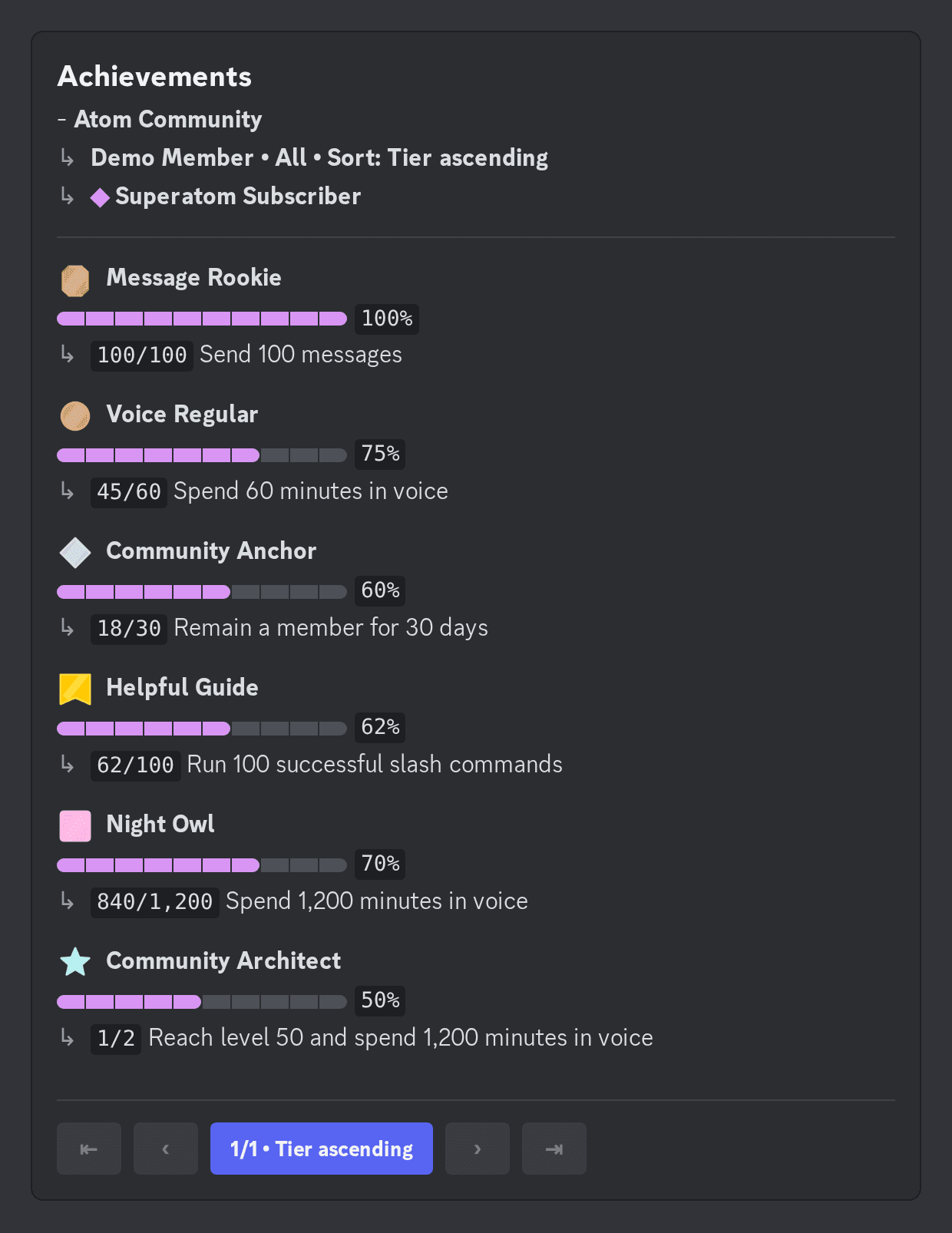
Square brackets in this table mean an optional Discord command option; they are not text to type into an option value. Achievement lists show up to 10 entries per page. Use the navigation buttons to move through pages and the sort button to cycle tier, name, progress, completion, and configured order. Those controls expire after 60 seconds of inactivity; run the command again to open a fresh view.
| Command | Use it for | Important behavior |
|---|---|---|
| /achievements all [member] | View all visible enabled achievements for yourself or the selected member | Shows progress bars, counts, percentages, and matching preset plaque emojis |
| /achievements completed [member] | Inspect earned achievements | Hidden manager awards appear after completion |
| /achievements uncompleted [member] | Inspect remaining visible achievements | A hidden manager award stays out before its unlock |
| /achievements assign member achievement [progression] | Grant a manual award or add a percentage of single-task progress | Progression accepts 1–100; percentage updates cannot be used for multi-task entries |
| /achievements unassign member achievement [progression] | Revoke a manual award or remove a percentage of single-task progress | Does not refund XP, reverse roles, or retract old announcements |
| /update achievements | Reconcile your own stored totals and current membership information | May cause real unlocks when eligible saved values satisfy tasks |
| /update all | Reconcile your own broader progression, including achievements | Also performs the command’s other updates; use the focused option when appropriate |
Reconcile historical progress carefully
Use /update achievements when you need Atom to compare your saved totals and current membership state with enabled achievement requirements. It can reconcile XP, levels, server-wide message and voice totals, reaction totals, successful Atom command counts, tracked invites, current tenure, current roles, and achievement dependencies.
Reconciliation is an actual progression operation. It respects current achievement eligibility and can unlock a milestone, apply its rewards, and announce it when the member’s stored values satisfy the target. It is different from Test in Discord.
It cannot invent missing historical events or recreate channel-specific activity from server-wide totals. Old crate claims, old trivia submissions, historical join events, and absent invite attribution should not be promised as automatic backfill. Opening an achievements list also checks tenure for the viewed member; it is not a general replacement for every synchronization source.
Maintain, duplicate, disable, or remove entries
Use the Enabled switch to pause an achievement while keeping its definition. Save the change before expecting the bot to use it. Defaults must be retained and can only be enabled or disabled. Custom entries can be edited, duplicated, advanced with Add Tier, disabled, or removed.
Duplicate copies a custom entry’s settings into a new disabled entry. Add Tier also copies its settings and advances its tier. Both consume a custom slot on Free and require another save. Review the title, target, tasks, rewards, and design: advancing a tier does not create a harder target for you.
Changing tasks on an existing achievement preserves members who already completed it. They remain completed and do not receive the same achievement’s rewards or announcement again merely because its definition changed. Members who have not completed it must satisfy the edited requirements. If you intend a new season or a separately earned milestone, create a new custom entry instead of treating a title change as a progress reset.
Before removing a custom achievement, check whether another entry selects it as a prerequisite. Update those dependencies together so saving does not leave references to a missing achievement. Disabling announcement delivery alone does not pause tracking or rewards.
If a subscription expires, the dashboard uses Free eligibility and premium controls become locked. To save on Free, keep no more than five custom entries and replace premium designs, uploads, and activities with allowed alternatives, or restore Superatom. Merely turning those entries off does not bypass the Free save limits.
Troubleshoot a setup or unlock problem
Start with the exact failing step: finding the server, saving the draft, counting eligible activity, recording the unlock, applying a reward, or delivering its announcement. These are different checks. Use one representative member and achievement so you can identify which stage is failing.
| Symptom | Check first | Next action |
|---|---|---|
| The server is missing from the dashboard | Your signed-in Discord account and server-management access | Sign in with the correct managing account and confirm Atom belongs to that server |
| A default cannot be edited or deleted | Whether it is labeled as an Atom default | Use Enabled, or create a separate custom entry for your own details |
| A choice is disabled with a dollar sign | The active server plan | Use a Free choice or review Superatom; custom uploads and Discord tests are premium |
| Add Achievement cannot create another Free entry | The number of custom definitions, including disabled entries | Remove an unneeded custom entry and save, or upgrade; defaults do not consume the five slots |
| Saving fails | The displayed validation message, dependencies, and complete collection | Correct the specific field, role variable, cycle, or plan restriction before retrying |
| Message, voice, or reaction progress stays at zero | Enabled state, saved settings, channel scope, bot visibility, and achievement exclusions | Perform new eligible activity in the configured channel and inspect that same member |
| A combined card does not unlock | Every task, not just the first target | Inspect the missing condition and its channel or required role |
| Tenure did not announce immediately on the threshold day | Current Discord join/boost timestamp and a later evaluation opportunity | Have the eligible member use Atom or reconcile achievements; inactivity alone is not an unlock scheduler |
| An invite did not credit an inviter | Regular invite attribution, invite-list access, the previous snapshot, and member deduplication | Test with a new non-bot join after a baseline exists; do not expect vanity-link attribution |
| Invite rewards cannot be added | Any Successful member invites task in the entry | Keep that achievement recognition-only; all reward categories are intentionally disabled |
| Completed achievement, missing role | Manage Roles, role hierarchy, and whether the side effect failed | Fix permissions and review the affected member’s reward separately; ordinary activity does not replay completed rewards |
| Completed achievement, missing announcement | A saved channel, bot permissions, and message delivery errors | Fix delivery before another controlled unlock; completion does not guarantee an old message will be retried |
| Test in Discord is unavailable or fails | Superatom, a selected server text channel, valid draft fields, membership, and the test cooldown | Correct the reported issue and wait at least 15 seconds before retrying |
| A Discord progress menu stops responding | How long it has been idle | Run the command again; pagination expires after 60 seconds |
| An edited target did not reset an earned achievement | Whether the member had already completed that same entry | Preserved completion is expected; use a new custom entry for a genuinely new milestone |
Launch the collection and explain it clearly
Begin with a small set of enabled milestones rather than announcing every possible task. Give staff a way to inspect progress and give members a plain-language explanation of what earns recognition, where unlocks appear, and how to report an incorrect result. Review whether targets encourage the behavior you intended after the first few weeks.
Adapt the example to your actual saved entries and channels before posting it. Do not advertise a reward or trigger you have not enabled and verified. Add tougher milestones, collection chains, or manager recognition when the first release is understandable and working.
Achievements are now live!

Earn milestones for eligible conversations and voice participation. Unlocks will appear in #achievements.

Start with First Conversation: send 25 eligible messages in #community-chat. Staff can help check progress or troubleshoot a missing unlock.

Please follow our normal channel rules. Quality participation matters more than chasing a counter.
Read the Achievements feature articleBrowse achievement ideasReview farming prevention
Before you publish
- The correct server is selected and Atom can view the channels that should contribute progress.
- Only the defaults and custom entries intended for launch are enabled, and the collection fits its active plan.
- Every title and description explains the actual saved requirements, including channel restrictions and combined tasks.
- Custom plaques are readable at Discord size; role-variable indexes and card colors have been checked.
- Every required task has an attainable positive target, and prerequisite chains have valid references without cycles.
- Rewards are proportionate, reward roles sit below Atom, and invite achievements contain no rewards.
- Announcement channel access, attachment delivery, and the exact message placeholders have been verified.
- Superatom cosmetic tests are treated as previews, and a controlled real unlock has verified tracking and any rewards.
- Save succeeded and the published configuration remains correct after revisiting the dashboard.
- Staff know that /achievements requires Manage Server, that completed entries are preserved after edits, and that unassigning does not undo past rewards.
- Members have a short explanation of the enabled milestones and a clear way to report a problem.